List Menu
License: LGPL-3.0 (GNU Lesser General Public License v3.0)
This resource is based on ox_lib which is licensed under LGPL-3.0.
⚠️ This redesign is a paid product. Only verified purchasers are eligible for support and updates. Unverified users will not receive any assistance under any circumstances.
Overview
3 list menu designs available via the ox:listmenu convar. Each design uses theme CSS variables for colors — only the layout and structure differ.
# config.cfg
set ox:listmenu 0
Designs
| Value | Name | Width | Description |
|---|---|---|---|
0 |
Default | 384px | Classic ox_lib list menu with header, scrollable items, tooltip descriptions |
1 |
Clean | 360px | Clean dark menu with icon containers, title + description, footer ESC hint |
2 |
Settings | 380px | GTA/Settings panel style with accent header stripe, uppercase labels, < value > arrows |
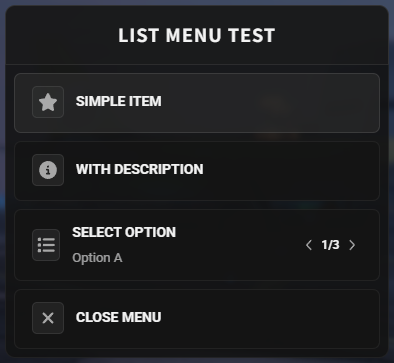
Design 0 — Default
The original ox_lib list menu. Features a centered header bar (60px), scrollable item list with icon containers, values scroll with chevron arrows and counter badge, checkbox and progress bar support. Tooltip descriptions appear on hover.
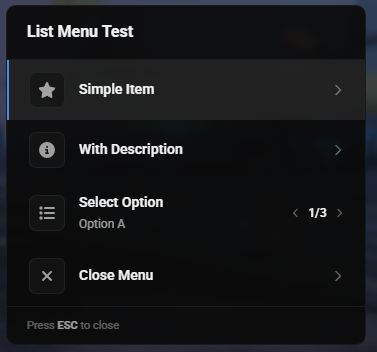
Design 1 — Clean
Clean dark menu with rounded icon containers (36×36), title + description layout per item, left accent border on selected, chevron arrows for values scroll, thin 4px progress bars, footer with "Press ESC to close" hint. Max height 420px with hidden scrollbar.
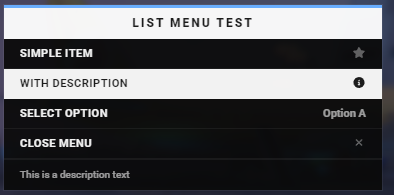
Design 2 — Settings
GTA V / RDR2 settings panel inspired design. White header bar with blue accent stripe on top, uppercase bold labels, selected row inverts to white background with black text. Values displayed as < value > with arrows that appear only on the selected row. Description of the selected item shown in the footer area. Max height 380px with hidden scrollbar.
Keyboard Controls
All list menu designs share the same keyboard controls:
| Key | Action |
|---|---|
↑ / ↓ |
Move selection up / down |
← / → |
Scroll values left / right (for items with values) |
Enter |
Confirm selected item / toggle checkbox |
ESC / Backspace |
Close menu |
Usage
Basic List Menu
lib.registerMenu({
    id = 'example_list',
    title = 'Example Menu',
    position = 'top-left',
    items = {
        { label = 'Option 1' },
        { label = 'Option 2', icon = 'fas fa-gear' },
        { label = 'Select Value', values = { 'Low', 'Medium', 'High' } },
        { label = 'Toggle Option', checked = true },
        { label = 'Progress', progress = 75 },
    }
}, function(selected, scrollIndex, args)
    print(selected, scrollIndex)
end)

lib.showMenu('example_list')
Last updated: 2025-07-14