Radial Menu
License: LGPL-3.0 (GNU Lesser General Public License v3.0)
This resource is based on ox_lib which is licensed under LGPL-3.0.
⚠️ This redesign is a paid product. Only verified purchasers are eligible for support and updates. Unverified users will not receive any assistance under any circumstances.
Overview
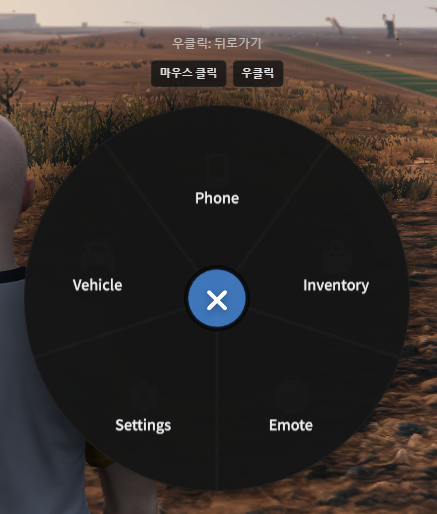
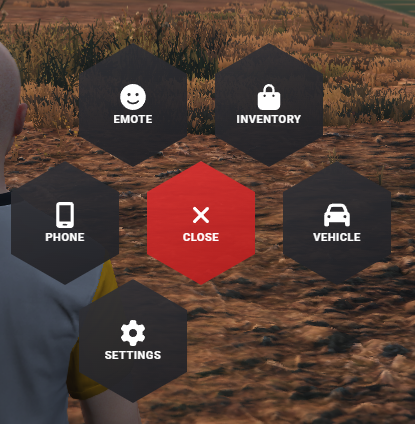
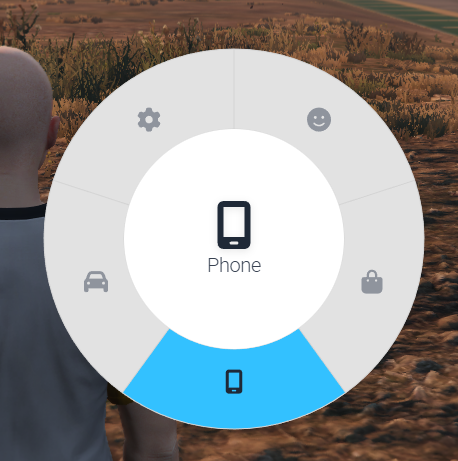
3 radial menu designs available via the ox:radial convar. Default keybind is Z to open/close.
# config.cfg
set ox:radial 0
Designs
| Value | Name | Items/Page | Description |
|---|---|---|---|
0 |
Default | 8 | Classic pie-chart sector style (original ox_lib) |
1 |
Hexagon Grid | 6 | Honeycomb hexagon grid with gradient buttons |
2 |
iOS Wheel | 8 | Circular wheel with blue highlight, white inner circle |
Design 0 — Default
Design 1 — Hexagon Grid
Design 2 — iOS Wheel
Usage
Adding Global Items
lib.addRadialItem({
    {
        id = 'police-menu',
        icon = 'shield-halved',
        label = 'Police Menu',
        onSelect = function()
            print('Police menu opened')
        end,
    },
    {
        id = 'garage',
        icon = 'warehouse',
        label = 'Garage',
        onSelect = function()
            print('Garage opened')
        end,
    },
})
Removing Items
-- Remove single item
lib.removeRadialItem('police-menu')

-- Remove all global items
lib.clearRadialItems()
Registering Sub-menus
lib.registerRadial({
    id = 'vehicle-menu',
    items = {
        {
            icon = 'lock',
            label = 'Lock',
            onSelect = function()
                print('Vehicle locked')
            end,
        },
        {
            icon = 'car-on',
            label = 'Engine',
            onSelect = function()
                print('Engine toggled')
            end,
        },
        {
            icon = 'car-burst',
            label = 'Hood',
            onSelect = function()
                print('Hood toggled')
            end,
        },
    },
})

-- Link to sub-menu from global item
lib.addRadialItem({
    id = 'vehicle',
    icon = 'car',
    label = 'Vehicle',
    menu = 'vehicle-menu',
})
Item Properties
| Field | Type | Required | Description |
|---|---|---|---|
id |
string |
✅ (global) | Unique identifier |
icon |
string |
✅ | FontAwesome icon name |
label |
string |
✅ | Display text |
onSelect |
function? |
— | Callback when selected |
menu |
string? |
— | Sub-menu ID to open |
keepOpen |
boolean? |
— | Keep menu open after selection |
iconWidth |
number? |
— | Custom icon width |
iconHeight |
number? |
— | Custom icon height |
Exports
lib.addRadialItem(items)
Add one or more items to the global radial menu.
-- Single item
lib.addRadialItem({
    id = 'my-item',
    icon = 'star',
    label = 'My Item',
    onSelect = function() end,
})

-- Multiple items
lib.addRadialItem({
    { id = 'item1', icon = 'home', label = 'Home', onSelect = function() end },
    { id = 'item2', icon = 'gear', label = 'Settings', onSelect = function() end },
})
lib.removeRadialItem(id)
Remove an item by its ID.
lib.removeRadialItem('my-item')
lib.clearRadialItems()
Remove all global radial items.
lib.clearRadialItems()
lib.registerRadial(radial)
Register a sub-menu with an ID and items array.
lib.registerRadial({
    id = 'my-submenu',
    items = { ... },
})
lib.hideRadial()
Close the radial menu if open.
lib.hideRadial()
lib.getCurrentRadialId()
Get the ID of the currently open sub-menu.
local currentId = lib.getCurrentRadialId() -- string or nil
lib.disableRadial(state)
Enable or disable the radial menu.
lib.disableRadial(true)  -- Disable
lib.disableRadial(false) -- Enable
Examples
Job-based items
-- Add items when player starts a job
RegisterNetEvent('job:started', function(jobName)
    if jobName == 'police' then
        lib.addRadialItem({
            id = 'police-actions',
            icon = 'handcuffs',
            label = 'Police Actions',
            menu = 'police-submenu',
        })
    end
end)

-- Remove when job ends
RegisterNetEvent('job:ended', function()
    lib.removeRadialItem('police-actions')
end)
Toggle with keepOpen
lib.addRadialItem({
    id = 'flashlight',
    icon = 'flashlight',
    label = 'Flashlight',
    keepOpen = true,
    onSelect = function()
        -- Toggle flashlight without closing menu
        ToggleFlashlight()
    end,
})
Last updated: 2026-02-18